Headset Adjustment: Eliminate Play and Ensure Smooth Steering
A properly adjusted headset is essential for confident handling and bike longevity. Too loose, and you’ll feel dangerous wobble in the front end. Too tight, and steering becomes notchy and difficult. This guide covers adjustment for both threadless and threaded headset systems.
Understanding Headset Types
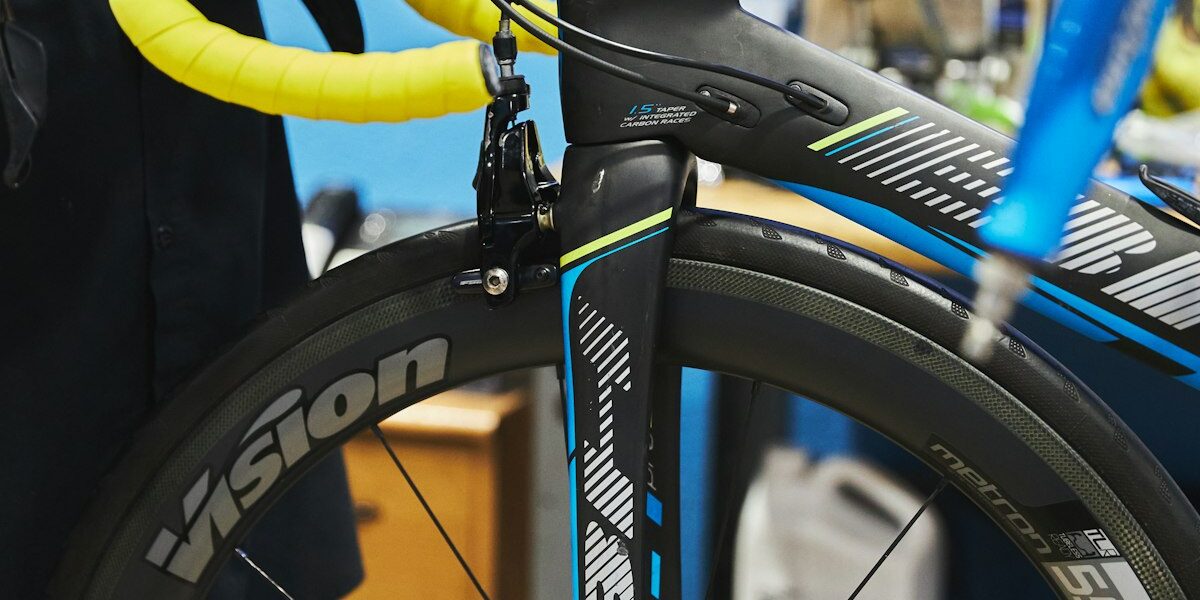
Threadless Headsets (Most Modern Bikes):
- Steerer tube passes through headset with no threads
- Stem clamps directly to steerer tube
- Preload adjusted via top cap bolt
- Includes: integrated, semi-integrated, and external cup designs
Threaded Headsets (Classic Bikes):
- Steerer tube has threads at top
- Stem inserts into steerer and expands to grip
- Adjustment via threaded locknut system
- Common on vintage and some utility bikes
Signs Your Headset Needs Adjustment
- Clicking or clunking: Felt in hands when braking or hitting bumps
- Loose feeling: Play when rocking bike back and forth with front brake held
- Tight steering: Resistance when turning bars, notchy feel in certain positions
- Indexing: Handlebars want to center in one position rather than moving freely
- Creaking: Noise when turning or when standing to pedal
Checking for Headset Play
Method 1: Front Brake Test
- Stand beside the bike
- Apply the front brake firmly
- Rock the bike forward and backward
- Feel for clunking or clicking at the headtube
- Any play indicates loose headset
Method 2: Lift Test
- Lift the front wheel off the ground
- Turn the handlebars slowly side to side
- Feel for resistance, notchiness, or catching
- Steering should be perfectly smooth
Adjusting a Threadless Headset
Tools Required:
- 4mm, 5mm, or 6mm hex wrench (for stem bolts)
- 5mm or 6mm hex wrench (for top cap)
Step-by-Step Process:
- Loosen stem bolts: Do not remove completely, just loosen until stem can move slightly on steerer
- Adjust top cap: Tighten the top cap bolt—this preloads the headset bearings
- Check adjustment: Feel for play using front brake test
- Fine tune: If still loose, tighten top cap more; if tight/notchy, loosen slightly
- Re-tighten stem: Once adjustment is correct, tighten stem bolts evenly to specification (typically 5-7 Nm)
- Verify: Recheck for play and smooth operation
Important Notes:
- The top cap preloads but does not hold the stem—stem bolts do that
- Stem bolts must be loose during adjustment for top cap to work
- Over-tightening the top cap damages bearings
- Proper preload feels firm with no play but allows free movement
Adjusting a Threaded Headset
Tools Required:
- Headset wrenches (32mm to 40mm depending on headset)
- Or large adjustable wrenches
Step-by-Step Process:
- Loosen locknut: The upper nut on the threaded stack
- Adjust bearing cone: The lower nut threads down to preload bearings
- Tighten cone: Until just snug, then back off 1/8 turn
- Hold cone in place: Using headset wrench
- Tighten locknut: Against the cone while holding cone still
- Check adjustment: Test for play and smooth rotation
- Repeat: If needed, the act of tightening locknut often changes adjustment slightly
Common Adjustment Problems
Play that won’t adjust out:
- Steerer tube may be cut too long (threadless)—add spacer or cut steerer
- Worn bearings need replacement
- Bent crown race or damaged cups
Binding or notchiness:
- Over-tightened preload—back off adjustment
- Bearing damage from prior over-tightening
- Contamination in bearings
- Bent steerer tube from crash
Creaking sounds:
- Dry bearings need grease
- Loose crown race
- Cracked or damaged components
When to Service or Replace Headset Bearings
- Adjustment cannot eliminate play
- Notchiness persists after proper adjustment
- Visible corrosion or pitting on bearings
- Grinding feel when turning bars
- Annual inspection recommended for all riders
Pro Tips
- Check after stem changes: Swapping stems often affects headset preload
- Preload is minimal: Just enough to remove play—bearings should not be compressed
- Use proper torque: Stem bolts are critical—use a torque wrench
- Inspect regularly: Especially after wet rides or crashes
- Grease bearings: Even sealed cartridge bearings benefit from occasional greasing
A well-adjusted headset provides confident, predictable steering and protects your frame and fork from damage. Take the time to get it right, and check it periodically to maintain perfect operation.


Stay in the loop
Get the latest bike maintenance pros updates delivered to your inbox.